 (925) 413-3870



 When you launch a hosted WordPress blog for your nonprofit, one of the first questions you might have is the difference between Pages and Posts. When would you use one over the other, and why?
The biggest difference between Posts and Pages is this: Posts are social media instruments. Pages aren’t.
The WordPress Post is the tool you’ll be using within your blog to engage readers. Posts are what everyone on Twitter and Facebook are sharing. They enhance sharing and engagement with:
- Comments – Although Pages and Posts have commenting features, it’s generally a good idea to deactivate the comments on Pages. You want your readers to comment on your latest post, not your legal disclaimer.
- Sharing – There are hundreds of WordPress plug-ins that enable your readers to share content – quickly and easily. Most of these plug-ins give you an option to deactivate sharing on Pages, as shown below:
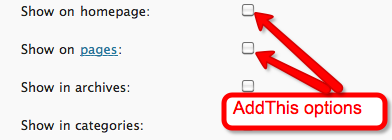
I use a few on my JohnHaydon blog: AddThis (below each post), Simple Facebook Share Button (above each post), Tweetmeme (above each post) and WP Google Buzz (above each post). Comment systems, like DISQUS, Intense Debate and Echo embed sharing into the commenting process.
Pages are static web pages within your blog for permanent content, like an About Page, a Donation Page or a Services Page. The website for Inbound Zombie is built with WordPress, sans posts.
Timely vs. timeless content
Posts are published in reverse chronological order on your home page or blog index page, depending upon how you’ve configured your blog (Sticky posts will remain above your latest posts). This allows visitors to see your most recent content first and dig for related posts within the archives.
Pages have no date and time associated with them.
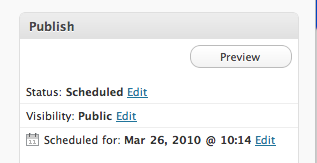
Posts can also be scheduled for future publication at a specific date and time, as shown below:
More distinctions
Because Pages aren’t published with respect to a time and date, they aren’t syndicated through RSS feeds or email blog broadcast services such as Aweber or Constant Contact.
Posts are generally short, bite-size pieces of content intended to bring your readers with you on a journey over time. For example, in January, I wrote a series over 31 days about optimizing your blog with social media (now an ebook!). This series gave me and my readers an opportunity to get to know each other – to go on a journey together.
Pages, on the other hand, are pit stops my readers can visit along the way if they want to learn more about me or my services.
Children vs. orphans
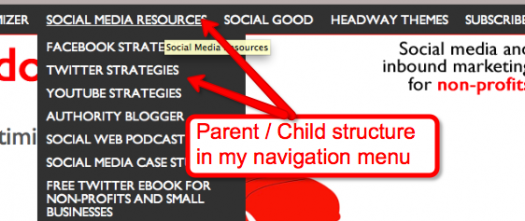
Pages allow users to create a hierarchy structure within your site, often referred to as a parent/child structure. Posts don’t allow for a parent/child structure, although you can do that with the Headway WordPress Theme (see How To Create A Bootylicious WordPress Nav Bar” for more info).
Traffic cop vs. GPS
The hierarchy feature of Pages turn site owners into traffic cops where visiters are pointed towards specific pages in relation to each other (a hierarchy. Posts, on the other hand, enable visitors to decide where they want to go via tags and categories.
How do you use Posts and Pages on your WordPress blog?
Related articles by Zemanta
- WordPress Basics – Session 1 (azrealestateblogs.com)
![Reblog this post [with Zemanta]](https://img.zemanta.com/reblog_e.png?x-id=1f34779c-b7ac-4a78-8aa7-0e8623677b4d)
John Haydon delivers social web strategy solutions for “the quick, the smart, and the slightly manic.” Curious? Then visit the John Haydon blog, follow him on Twitter or leave a comment.

 This work is licensed under a Creative Commons Attribution-NonCommercial 3.0 Unported.




Really good post, John.
I'd like to add a couple of thoughts:
– It depends on what your organization is trying to accomplish with your blog. Here at Socialbrite, our Posts & Pages are equally essential elements of our blog. We use Pages for many of our essential pages, like the Sharing Center, our Videos landing page, our Cause organizations page, Our directories of free photos, videos and music, and much more.
It's my opinion that in the world of posts, too much flies by and then disappears into the archive ether. That's why we try to focus on building resources (on pages) that will be relevant months and years from now.
– For the same reason, we don't deactivate comments on Pages, because we welcome our readers' contributions to these learning materials and hope they'll grow richer over time.
So, as I said, it all depends on what you're trying to achieve.
JD – I totally agre. It does depend upon use. Rules can only be broken once they're known.
It was certainly interesting for me to read this article. Thank you for it. I like such themes and anything connected to them. I would like to read more soon.
Jane Swift
london escorts indian
Hi John, I am interested in that eBook but the link takes me to a webinar page.
Thanks
I think the distinction, while sound in theory, can be quite inconvenient in practice. I’m using a theme right now that conforms to “WordPress orthodoxy” in that regard but which, in practice, has meant some inconvenience for me as a lay user!
hi, I am trying to sell some digital products and for that I have created a post offering this products. I do not know if this is the best option for this purpose or should I create a Page or a Product page? Also I would like to know how to make individual my post and not connected with other posts I am making all the time. Thanks a lot