Socialbrite Archives: February 2010
How are nonprofits using text messaging?
Organizations starting to use SMS as powerful tool for fund-raising

We’ve just released a new report, Nonprofit Text Messaging Benchmark Study, that offers the first-ever look at how organizations in the United States are using text messaging and how subscribers are responding. It shows that mobile phones are becoming increasingly popular as an advocacy and fund-raising tool by organizations, and it provides benchmarks and metrics by which nonprofit organizations can measure their success with text messaging.
Co-authored by myself and Michael Amoruso and Jessica Bosanko of M+R Strategic Services, the free report also illustrates the various ways in which organizations are using text messaging. The study was sponsored by Mobile Commons and mGive.
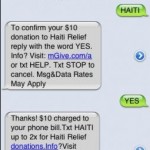
The earthquakes in Haiti earlier this year showed the power of SMS as a tool for fund-raising (raising millions in just a few days), and it’s now clear that there’s an opportunity for nonprofits to tap into the mobile market to engage their supporters. As the study reports, there are currently over 276 million wireless users in the U.S., and during the first half of 2009, users sent about 740 billion text messages. The report breaks down not only how nonprofits can use SMS to interact with supporters but also releases statistics on how specific organizations fared with their SMS campaigns.
You might be interested in learning:
- How nonprofits engage supporters through text messaging
- The advantages and limitations of text messaging as a tool for engagement
- How to evaluate the performance of a text message
This work is licensed under a Creative Commons Attribution-NonCommercial 3.0 Unported.
One Comment
How to set up an SMS campaign system

Mobile advocacy basics, from from keyword response to mobile data collection
Guest post by Melissa Loudon
MobileActive
S MS is everywhere, in an amazing diversity of applications. From enabling ‘instant protest’ in the Philippines, Spain and Albania, to election monitoring in Ghana, Lebanon, and Sierra Leone to HIV/AIDS education and support in Mexico and South Africa, we’ve seen that 160 characters can make a difference. This how-to covers the basics of setting up an SMS campaign system, looking at different approaches to suit your goals, budget and technical expertise.
What do you want the system to do?
Before you start, it’s important to have a clear vision of how you want to use the system, and who the target audience might be. You should also do a level-headed audit of the resources available, including funding as well as staff time and technical expertise. If this doesn’t look promising, take heart! Sometimes the most effective systems are the simplest, and you don’t need a big budget for many types of SMS campaigns.
3 types of SMS campaign systems
In a MobileActive Primer on Desktop SMS Campaign Tools, Ben Rigby and Katrin Verclas identify three ways to use SMS campaign systems: Text blasting (bulk messaging), keyword response and smart texting. We’ll summarize the three approaches here.
Continue reading »
This work is licensed under a Creative Commons Attribution-NonCommercial 3.0 Unported.
10 Comments
An easy way to organize applications online
Applicant Manager Overview from WizeHive on Vimeo.
New software tool can help workflow for nonprofits, foundations & NGOs
Processing applications and proposals from prospective employees, contestants or grant-seekers can be a hassle for nonprofits, foundations, NGOs and small businesses. Your email in-box quickly becomes cluttered and it becomes a daunting task to separate the wheat from the chaff — making managing those boatloads of bits a major hassle.
A new app that just came across our desk looks like it goes a long way toward solving those problems. It’s called
“Applicant Manager is particularly suited to the needs of nonprofits, foundations and NGOs that process applications for scholarships, awards, contests, admissions and more,” says spokesperson Rebecca Reeve.
Continue reading »
This work is licensed under a Creative Commons Attribution 3.0 Unported.
2 Comments
Why your nonprofit should check out Google Buzz
You’re probably wondering (like I’ve been for the past week) if your non-profit should be using Buzz. And I’ll agree with you – it’s not an easy decision.
At first glance, Google Buzz seems like a cross between Twitter and Facebook.

You have followers and following like on Twitter, and you can “like” and “comment” on posts like on Facebook. It almost seems like Google is copying both networks and maybe even “acting like a spoiled brat“.
But there are at least three things that make Buzz different from Facebook and Twitter:
- User Base – Unlike Facebook and Twitter, Buzz has an instant user base (over 176 million in December according to ComScore) right out of the gate.
- Groups – Unlike Twitter and Facebook, you can create custom private groups using Contact Groups within Gmail. This allows you to create your own private stream with family, co-workers, or friends.
- Inbox – This is probably the biggest difference between Buzz and Facebook / Twitter. Buzz happens right within Gmail. This, by the way, could be a blessing and a curse (sharing unsolicited news about your nonprofit could feel invasive)
This work is licensed under a Creative Commons Attribution-NonCommercial-ShareAlike 3.0 Unported.
7 Comments
Choose the best settings for your Facebook Page
When you set up a Facebook Page, you want make sure you do it in a way that optimizes the Page for best results. For example, if you encourage fans to post photos, they will be more likely to return.
This video goes over all the setting in a Facebook administration panel, keeping strategy in mind.
For instance, you can upload video and photos to your page by enabling the mobile setting. And you want to enable “Post by Page and Fans” to have more of a conversation with your community.
If you’re interested, I’ll be conducting a webinar on Facebook with Charityhowto.com today at 1 pm EST/ 10 am PST.
This work is licensed under a Creative Commons Attribution-NonCommercial 3.0 Unported.
0 Comments
Helping Haitians via mobile, crowdsourcing & social media
New platform revolutionizes the way emergency response takes place
Guest post by Katrina Heppler
envisionGood.tv
Bravo to the thousands of volunteers worldwide who are assisting with translating Creole mobile text messages to help people in Haiti following the devastating 7.0M earthquake that struck the nation Jan. 12.
You may not have heard of Mission 4636, but this is where a lot of the most remarkable relief work is taking place. Mission 4636 is a short code emergency response communication system that enables earthquake victims in Haiti to get life-saving aid by sending a free mobile text message. It’s a joint-project of Ushahidi, FrontlineSMS, CrowdFlower and Samasource.
Mission 4636 — named for one of the SMS short codes for Haiti relief efforts — is an outstanding example of global collaboration and the power of human ingenuity to help people and save lives through technology. A huge “hats off” to them as well as to the many organizations that have also come together to make Mission 4636 successful: inSTEDD, DigiCel, local radio networks, local NGOs and the many emergency responders.
In the video interview above, Brian Herbert of Ushahidi, Robert Munro of FrontlineSMS, Lukas Biewald of CrowdFlower and Leila Janah of Samasource share background on how they came together with the support of other organizations on the ground in Haiti to deploy a critical emergency communications system to help save lives and provide emergency resources to people following the earthquake. This is a massive effort across multiple non-profit and for-profit companies and individual volunteers from around the country and globe (more than 14 countries have been involved in translation).

In the weeks after the tragedy, text messages to the dedicated Haiti emergency short code 4636 increased about 10 percent each day – with about one text a second coming through. Technology and people power are playing a critical role in getting information to military and aid workers on the ground. Beyond the immediate help for people in need in Haiti, the program will build computer centers so Haitian refugees can do valuable digital work, get paid, and bolster the economy around them.
Continue reading »
This work is licensed under a Creative Commons Attribution-NonCommercial 3.0 Unported.
One Comment
How to get supporters to retweet content

One of the central benefits of social media is the ability to share content with just one or two mouse clicks. Your supporters are already sharing interesting content on Facebook. They’re retweeting it. They’re favoriting videos on YouTube as well.
All with one mouse click.
But even though sharing has gotten easier, actually getting people to share can feel like pulling teeth. And when when you see other non-profits getting thousands of views on YouTube with what seems like no effort, it’s downright frustrating.
So how do you get people to share your content?
5 tips on sharing
1. Accept that social media is not email
Having an email list of 80,000 people is a far cry from having an active, thriving community of fans. The same goes for the 5,000 fans you have on Facebook, especially if they fanned your Page only for a chance at winning a free iPod (yawn). It’s all about vitality. So stop thinking so much about accumulating numbers. Instead, start thinking about nurturing the 1% who are already raving fans.
Continue reading »
This work is licensed under a Creative Commons Attribution-NonCommercial 3.0 Unported.
0 Comments
Should CEOs and executive directors use social media?
The NASSCOM India Leadership Forum has multiple tracks based on theme. I was asked to facilitate a session on the question, “Should CEOs and Executive Directors Use Social Media?”
To prepare for this session, I asked colleagues in the US to share their collective wisdom so we could see the US perspective. In addition, during a roundtable on social media at the conference, I was fortunate to meet social media experts in India (@nirav, @amnigos, @pranavbhasin, @paritoshsharma and @avinashraghava), who shared some examples.
For social media to have full impact, it needs to scale within an organization. Your organization’s social media strategy should be not implemented by one lonely intern sitting in the corner of your communications and marketing department.
You may be wondering if that means that your executive director and CEO needs to write a blog or have their own Twitter account to share their wisdom. I think it depends.
There are definitely some benefits to having your executive director or CEO being present on social media channels. They can provide a human face to your organization’s work, a unique viewpoint, and serve as a thought leader in your field. And if your organization finds itself in the middle of groundswell or if there is a major news event or a public relations crisis happens and it is being discussed on Twitter or other social media spaces, your CEO can join it without having to get up to speed.
Continue reading »
This work is licensed under a Creative Commons Attribution 3.0 Unported.
One Comment
Marshall Kirkpatrick on the Real Time Web Report
Anew report from ReadWriteWeb, The Real-Time Web and Its Future, focuses on the changing ecosystem of the Web, one that runs in real-time: “For the following report, we interviewed 50 companies, developers and executives building or leveraging real-time Web technology. We combined that research with insights gained from more than 300 industry leaders that participated in our Real-Time Web Summit in October 2009. The end result is an extensive, authoritative premium report: The Real-Time Web and its Future, edited by ReadWriteWeb lead writer Marshall Kirkpatrick.”
I recently had the opportunity to connect with Marshall to discuss the report and the insights RWW discovered through the process of aggregating and distilling so much information from experts and Web users.
Review the Table of Contents and read the report introduction now, or learn more in the following interview.
First, what does the “real-time Web” really mean?
It means different things to different people, but the most literal meaning is probably this: real-time systems push information from a publisher to a subscriber (be they a human reader or a machine consuming information) as soon as it’s available, without the subscriber having to ask if there’s anything new.
Think of how Facebook notifies you that you have new messages without having to refresh the page, or the way your Instant Messaging client shows you new messages as soon as they are sent. The underlying technologies used in those kinds of circumstances are now being integrated into all kinds of other websites because real-time delivery of information changes the user experience radically and offers all kinds of benefits. It’s smoother for users, users and systems get to take action immediately on new information and it’s much more efficient, meaning that your technology can do more with less computing expense.
When did RWW start focusing on the real-time Web?
Probably middle of 2008. Like people generally do, we thought about the impact that Twitter and Facebook were making on the web. When we looked deeper though, we quickly found out that there is far, far more going on in the real-time web than those two services.
For the report, you interviewed 50 Web experts – what were some of the surprising things you heard?
I was surprised to learn how broad this field is. We talked to people working with public records extraction in real time, with designers building lightweight, real-time presentation sharing tools, Google engineers have some incredible ideas about ways they hope that their PubSubHubbub real-time protocol will be used – stuff like real-world sensor networks and contact info syncing. When I started those interviews, I knew there were broad possibilities but I had no idea how broad.
Continue reading »
This work is licensed under a Creative Commons Attribution-NonCommercial-ShareAlike 3.0 Unported.