Socialbrite Archives: December 2010
10 favorite nonprofit books of 2010

“Digital Activism” was one of several books Beth gave to her friends at iHub in Nairobi.
Guest post by Beth Kanter
bethkanter.org
During 2010, I been able to read, blurb, write reviews, do blog giveaways, or author guest posts and interviews for a lot of terrific books that would be useful to nonprofit professionals in the social media, marketing, and ICT areas. Many authors generously sent me review copies . I also have a small pile of books sitting on my desk that I wanted to blog about. So, to close out the year, I thought I’d share this list of books with you, especially if Santa gave you an Amazon gift card.
Technology at the Margins: How IT Meets The Needs of Emerging Markets by Salesh Chutani, Jessica Rothenberg AAlami, and Akhtar Badshah
1I read the manuscript over the summer so I could blurb this book. The book looks at how ICT can help solve global poverty issues in a range of fields, including disaster relief, health education, micro finance, and education. It is filled with great examples and stories from around the world. The book is well-researched and offers frameworks for thinking about how to link technology to a theory of change. More about the book here. The authors were kind enough to give me a copy to give away on this blog, so if you leave a comment you could be the lucky winner of a book!
Digital Activism Decoded: The New Mechanics of Change, Mary Joyce, Editor
2Digital activism is defined by the Meta-Activism Project as “the practice of using digital technology for political and social change.” Mary Joyce is one of the thought leaders in the field. She is the founder and executive director of the Meta-Activism Project. I first met Mary in 2005 through my connection with the Global Voices community and can say that Mary is among the most knowledgeable and experienced digital activists in the world. I’m honored to be working with her on a training project that I’ll share more about in 2011. The book is available on Amazon or as a free download.
Hands-On Social Marketing: A Step-by-Step Guide to Designing Change for Good by Nedra Kline Weinreich
3Nedra Kline Weinreich is a social marketing whiz kid. I’ve been a fan her work since 2006. Her book is fantastic workbook that will lead you through six fail-proof steps to social marketing success. I love the checklists, her thoughts about the impact of social media and behavior change, and the DIY market research techniques. We were lucky enough to have Nedra stop by the Zoetica Salon and share some thoughts about how to measure social media outcomes. The book is available on Amazon.
The Wild Woman’s Guide to Fundraising by Mazarine Treyz
4I met Mazarine Treyz three years ago in Portland, Oregon, when I facilitated a one-day social media and nonprofit workshop for the Meyer Memorial Trust. She’s been a regular commenter on this blog. Her book is perfect for small nonprofits who are looking for practical and tactical tips and wisdom in developing a fundraising plan. You can get a copy here.
Zilch by Nancy Lublin
5Nancy’s book launched the same month as the Networked Nonprofit. I read it on long plane rides and ended up doing a book giveaway at one of my book talks! Non-profits are told to learn from business; in insightful and humorous book, Lublin, over at DoSomething.org, tells the for profit sector what it can learn from non-profits, particularly about how to thrive with virtually no money. The book made Philanthrocapitalism’s Books of the Year List (so did Networked Nonprofit). Pick up your copy of the book on Amazon.
Continue reading »
This work is licensed under a Creative Commons Attribution 3.0 Unported.
One Comment
Facebook Pages now offer easier ways to create friendly urls
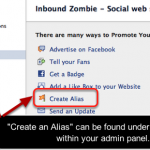
Facebook Pages now have a new option called “Create Alias” under “Marketing” within the admin panel. An alias is a shortened url for your Facebook Page, making it easier for potential fans to remember, and easier to use in print, radio or TV (see facebook.com/CreatingTheFuture as an example). Pages admins can create an alias once they have a minimum of 25 connections.
This new approach differentiates the feature from what most people might consider log-in credentials (username / password).
Also, having this located in the admin panel enables users to be more aware of this feature.
See also:
• How to create a custom Facebook Page url
• More Facebook tutorials
This work is licensed under a Creative Commons Attribution-NonCommercial 3.0 Unported.
2 Comments
SeeYourImpact: Affiliates help spread the joy

A short CNN segment on Apolo Ohno and SeeYourImpact.
Nonprofit, HasOffers let you connect with recipients of your gift this holiday season
Here at Socialbrite, we’re big believers in how online platforms are democratizing online philanthropy, volunteerism and social entrepreneurship, and we’ve profiled several of these organizations — Jolkona, InVenture, Kiva, CatchaFire, VolunteerSpot — and listed them on our Cause organizations page.
So in this last week of December, when an astonishing one quarter of all annual online giving takes place (22 percent in the last two days), we’re happy to see a partnership between SeeYourImpact, a remarkable example of one-to-one philanthropy, and HasOffers, a monitoring platform making a commendable splash in the social good sector.
Here’s how the partnership works:
SeeYourImpact, a 501 (c)(3) nonprofit in Seattle, promises this: Give a gift, and in about two weeks you’ll receive the photo and story of the person you helped, with staff on the ground capturing the moment when your gift is delivered. The organization guarantees that 100 percent of every dollar donated goes directly to the people you designate. People can choose from a wide array of gifts that help people all over the world, solutions like $10 mosquito nets or $29 clean water filters.
— Peter Hamilton,
VP of Marketing, HasOffers
HasOffers is helping SeeYourImpact build its own affiliate program — that is, through referrals and social software. Affiliate marketing generates 5 to 20 percent of online sales for the world’s biggest brands. HasOffers is providing the tracking software pro bono, and affiliates join the program to refer new donors (perhaps you?) to SeeYourImpact.
“We have plans for several more nonprofits in 2011, but we felt that SeeYourImpact was the best candidate to kick things off,” says Peter Hamilton, vice president of marketing for HasOffers. “Their model is strongly tied to the world of social sharing, making them the perfect opportunity for HasOffers to make a difference. We want to show nonprofits how working with grassroots publishers is a powerful way to engage their audiences and move beyond traditional media. We also believe in the power of the blogging community and in supporting quality publishers.”
Adds Shari Goetsch, director of communications for SeeYourImpact: “We’re focused on connecting donors with the lives they’re changing. Thanks to HasOffers, we hope to engage more people in our mission to make charitable giving engaging and transparent.”
There has been little testing of good affiliate channels by the nonprofit community, so we’ll be watching eagerly to see if this is an effective way for nonprofits to engage the grassroots publishing community.
Please give an affordable amount to someone in need.
To get more information about the program or to work with SeeYourImpact, contact Shari at shari@seeyourimpact.org
This work is licensed under a Creative Commons Attribution 3.0 Unported.
0 Comments
Support the campaign for girls’ education in Asia
By Sherry Miller
Socialbrite
The Asia Foundation, a San Francisco-based nonprofit, has created a cutting-edge Facebook video campaign, “Tell Her She Can,” which supports girls’ education in Asia. The Bank of Tokyo-Mitsubishi UFJ has offered to donate $1 for each Facebook “Like” that the “Tell Her She Can” video receives up to $15,000 toward girls’ education in Asia.
Here’s how to participate:
- Go to the Asia Foundation’s Facebook Page.
- LIKE this page.
- Click on the video “Tell Her She Can.”
- Click on the LIKE button under the video.
The campaign is up only for the holiday season. Asia Foundation has until Dec. 31 to reach the goal of $15,000.
The Tell Her She Can video is also playing on the CBS Superscreen in Times Square, New York. Bank of Tokyo-Mitsubishi UFJ is donating $5 for each Facebook “check-in” at that location to go toward the same fund.
Thank you for spreading the word and contributing to girls’ education in Asia!
Learn more about the Tell Her She Can fund here or contact Jennifer Chowdhury.
This work is licensed under a Creative Commons Attribution 3.0 Unported.
0 Comments
10 steps to create a great call to action

One of the most important elements on your nonprofit’s website is your call to action.
You might have a great design, compelling content and lots of visitors to your site. But what’s it worth if no one does anything on the page?
What is a ‘call to action’?
A call to action is just that – a direction or request for your visitor to take action. You want them to do something.
That something can range from sharing content via social media, joining an email list, signing a petition, or making an online donation.
10 steps to create a killer call to action on your site
- Know the time and place – If most of your traffic is coming from search, it means that the majority of people visiting your site are being introduced to you for the first time. They probably won’t make a donation, but they might “like” your Facebook Page or join an email list. You might not get kissed on a first date, but you might get a “yes” to a second date. Take the “yes”.
- Tell them what you want - Don’t be afraid to tell people what you want them to do. They’re busy. They want to be told.
- Make it about them – Instead of saying “Join our email list,” say “Don’t miss out!” Email lists are boring, but “missing out” is painful. Think about what value they gain from taking action.
- Be specific – Giving people three donation amounts to choose from will get more results than making them come up with an amount. Guesswork takes time – remove it.
- Keep it simple – If they have to spend a minute or two to understand what you’re asking, you’ll lose them. Make sure your call to action is easy to understand.
- Make it personal - Tell personal stories about real people. People will take action to feed a little girl in Haiti before 500,000 homeless children.
- Create a short line-of-sight – Tell them how their specific donation will make an impact. “Your $10 will pay for a child’s lunch at school for an entire month.”
- Reduce the number of clicks – Remove CAPTCHAS, use Facebook Connect (the log-in protocol), keep the transaction all on one Page (as Razoo does).
- Say thank you – Tell them sincerely how much their donation means. A thank you goes a lot farther than you may think.
This work is licensed under a Creative Commons Attribution-NonCommercial 3.0 Unported.
0 Comments
Use your online shopping habit to help a charity

Rec.fm donating 100% of product recommendation revenues to benefit Red Cross, Kiva, other nonprofits through Dec. 31
By Sherry Miller
Socialbrite
Buy what you love, recommend products you love, and your favorite charity receives a donation. How could this be? Rec.fm, a new donor-driven website, makes this happen in three simple steps: choose a product, recommend it, share it.
Rec.fm — a website and Facebook application based in Silicon Valley — has a mission to create, find and share your trusted recommendations for quality products. You recommend. People click or buy. Charities benefit. Half of Rec.fm’s site earnings are donated to the charities you choose.
Here’s how it works: Go to Rec.fm. Pick a product you like. Write 140 characters to tell your friends why you love it and add some tags so others can find your rec in the Rec.fm directory.
When you tell Rec.fm exactly what you like about the product you’ve chosen, the site will generate a short url that you can share on Facebook, Twitter and other social networking sites. When your friends click on it, they’ll be taken to a Rec.fm site with more details on the product. If they decide to buy the product, Rec.fm receives a payment from the retailer and more than half of it is passed on to the charity of your choice.
Until the end of the year, Rec.fm will donate 100 percent of its revenues to these great nonprofits: The American Red Cross, National Foundation for Cancer Research, Water.org, Kiva and the American Foundation for Children with AIDS. Rec.fm sent its first three checks in early December to Kiva, The Red Cross and the NFCR. Rec.fm also gives away prizes and gift cards on a weekly basis.
Continue reading »
This work is licensed under a Creative Commons Attribution 3.0 Unported.
3 Comments
Guide to publishing a successful ebook

Mashup image by Mike Licht on Flickr … and Renoir.
And 7 services that let you earn income for your works
Target audience: Authors, journalists, researchers, nonprofits, cause organizations, NGOs, educators, Web publishers.
By Kim Bale
Socialbrite Senior Writer
Becoming a published author is easier now than it’s ever been, particularly if you’ve got the itch to write an ebook. With more than 50 digital readers competing for consumer attention, the market is ripe for affordable Web-based writing and there is no shortage of ebookstores to sell it in, whether it’s fiction or nonfiction, a short story collection or scintillating set of essays.
If you’re a nonprofit or a social cause organization, think about some of the materials, studies and reports that you’ve produced and consider whether they can be organized into an ebook that offers value to the community.
Google’s entry into the ebooks marketplace last week will likely provide new opportunities for authors and readers, given that its open platform is not tied to a proprietary ebook reader.
In an effort to make sense of the e-publishing landscape, we’ve compiled this list of user-friendly websites guaranteed to help your ebook reach an interested audience.
Some tips to prepare your ebook for publication
Before you begin to scout publishing options, you’ll need to do some research. Take the time to clearly define your subject, skim the work of your peers and potential competitors and craft a unique angle to position your book.
Make sure you acquire quality artwork and cover art. This will set your ebook apart from the thousands of others in the sector. Once completed, we suggest that you put your ebook through a sort of quality assurance testing by showing it in advance to fellow authors, publishers and agents.
Two writing and editing services you should know about:
• Authonomy by Harper Collins is a great site for writers to glean feedback on their work in excerpts or its entirety. The Authonomy community can recommend books for the “editor’s desk,” or top five, where they’re granted face time with industry professionals and have the potential to be published in a more mainstream environment.
• WeBook invites authors and readers to share their work, connect with agents and take part in writing challenges. Community members can rate stories, earn badges based on ratings and comment on each other’s writing – it’s like crowdsourced editing in a fun, virtual environment.
Sifting through electronic publishing services
What would any industry be without competition? The Web abounds with ePublishing services eager to hold your hand through the intimidating process of self-publishing – from idea formation to thoughtful illustration and cover art – and in many cases you don’t have to choose just one. Just remember, even these services are optional: You can create an ebook by publishing it as a PDF or Word document and uploading it to your own site.
Smashwords: 25,000 ebooks on the shelf
1Smashwords is arguably the most appealing free service to help take your work to the iPad, Nook, Sony Reader, Kobo and more. With more than 11,000 published authors boasting more than 25,000 original works, Smashwords is a good choice for anyone new to ePublishing.
- File formats accepted: Microsoft Word file in compliance with Smashwords Style Guide (it’s a free, useful resource even for those who choose to publish elsewhere!)
- Distribution: Apple iPad iBookstore, Barnes & Noble, Kobo, Sony, Diesel and other retailers. Document must comply with guidelines outlined in the Smashwords Premium Catalog.
- Fees: Free.
- Royalties: Authors can expect to earn 85% of net sales at the Smashwords.com retail site and 60% of the list price from major ebook retailers (Apple, B&N, Kobo, Sony, etc.) — the retailer gets 30% and Smashwords takes 10%. You name the price of your ebook and can change it anytime.
FastPencil: ebook publishing made simple
2FastPencil uses professional book templates to simplify the writing, publishing and selling process. A variety of publishing packages are at your fingertips, offering professional help with graphics and cover art to detailed editing while leaving you in control of the entire process.
- File formats accepted: Any! Just input your content into the Publishing Wizard and your ebook will automatically be formatted into ePUB and PDF, two very popular file extensions.
- Distribution: Depending on which package(s) you choose, your title could wind up on the virtual shelves of more than 32,000 online retailers, including Amazon and Barnes & Noble. Distribution costs range from $9.99 to $149.
- Fees: Free to sign up and offers a variety of publishing packages and individual services ranging from no cost to several hundred dollars.
- Royalties: FastPencil recommends that no book be priced more than $9.99. Based on this price, you earn about 80% of net sales from their marketplace and 55% of the list price from mainstream retailers.
Amazon: Get onto a Kindle
3Amazon’s Digital Text Platform allows authors to self-publish their titles straight to the Amazon Kindle Store – for free! The Kindle now produces more sales than Amazon’s hardcover books, Newsweek reports.
- File formats accepted: Kindle supports HTML, MP3, PDF and TXT files, though when publishing through the Digital Text Platform, it is best to upload your content as HTML, ePUB or TXT, as DOC and PDF are complex and may lose formatting in the conversion.
- Distribution: Amazon Kindle Store.
- Fees: None.
- Royalties: Amazon offers a 35% Royalty Option or 70% Royalty Option for digital works. When choosing the 35% Royalty Option, your ebook has a minimum list price of 99 cents, with this cost increasing based on file size and maxing out at $200. When choosing the 70% Royalty Option, your book must be priced from $2.99 to $9.99, and you can only collect 70% from sales in the United States, with foreign sales earning 35%.
PubIt: Get your work on the Nook
4PubIt! By Barnes & Noble gives authors the opportunity to sell their works with the world’s No. 1 bookseller, ideal for the Nook eReader. In three easy steps, your book will go from dream to ebook reality.
- File formats accepted: PubIt! Will convert your DOC, DOCX, HTML, RTF, most images and TXT files to the popular ePUB format used with the Nook.
- Distribution: Sell your books alongside famous authors at http://www.bn.com.
- Fees: None.
- Royalties: Your ebook must be priced between 99 cents and $199.99. For ebooks priced at or between $2.99 and $9.99, authors collect 65% of the list price. For ebooks priced less than $2.99 or more than $9.99, authors earn 40% of the list price.
Google eBooks: Do it yourself — literally
5 Both a bookstore and a library, Google eBooks is a big new electronic playpen for book lovers. It offers nearly 3 million books for free downloads (generally old public domain titles) and hundreds of thousands of titles for sale, ranging from new releases and bestsellers in every category to classics. Its singular achievement is that it’s an open platform, so that Google eBooks works with myriad devices — tablets, smartphones, computers, even most e-ink devices.
Google eBooks come from a Partner Program and the Library Project. To date, its partners have been traditional and small publishers (as well as universities and libraries), and it’s not really currently set up as a do-it-yourself ebook solution. Google assumes you already have a completed ebook in hand and want to use their marketing muscle to distribute it.
- File formats: Google’s ebooks are store in the cloud and can be read on your computer, tablet or smartphone directly within a browser or application. Alternatively, authors can upload a variety of formats to be read on an eReader (though not the closed Kindle).
- Distribution: You can purchase Google eBooks directly from the Google eBookstore or from a number of independent booksellers and retail partners such as Indie Bookstores, Alibris and Powell’s Books. A Google eBooks application can be downloaded for the Apple iPad and iPhone.
- Fees: Free for authors to add their works to the Google eBookstore.
- Royalties: Uncertain and evolving. Best Ebook Readers has a good primer on how authors can add an ebook to the Google eBookstore, however, there’s no discussion of setting prices. And while Google eBooks says authors can earn money from sales, it doesn’t detail how it works.
This work is licensed under a Creative Commons Attribution 3.0 Unported.
8 Comments
14 free tools to measure your social influence

A screenshot of the TwitterPoster visual application. (Image by mil8)
Are your online efforts getting traction? Start your metrics engines!
Target audience: Nonprofits, brands, businesses, foundations, NGOs, cause & community organizations, Web publishers, educators, individuals. In this series:
• Getting started with social media metrics
• How to measure your nonprofit’s social media success
• Guide to social media metrics (main page)
Congratulations, you’ve jumped into the social media waters, and it feels pretty nice. Now what?
Your social media plan — if you have one — should consist of goal-setting, implementation and measuring, among other things. That last part, metrics, is frequently overlooked, partly because the tools for measuring are still maturing and partly because there’s no clear agreement over what to measure. (For our suggestions, see How to measure your nonprofit’s social media success.)
Not all tools measure the same kinds of things, so you may find several of these useful for your efforts. In addition, some are useful for measuring your blog’s or website’s reach, while others assess your mojo on a particular social network. Our criteria? The tool must be useful, free (freemium versions are allowed) and we had to use it ourselves.
Here are 14 free tools to measure your organization’s impact in social media and on the Web. Please add your own favorites in the comments!
SEMRush: What does your site rank for?
1I’ll bet you a nickel you haven’t heard of SEMrush — and that you’ll find it valuable. Just plunk your blog or website url into the search field atop the page and SEMRush will show the keywords it ranks highest for. For example, I had no idea that my Socialbrite article 4 examples of corporate social responsibility done right is the No. 1 Google search result for “examples of corporate social responsibility” or that our article How to set up an SMS campaign system is the No. 2 Google search result for “sms campaign.” SEMRush will show you what you rank for, what your competitors rank for, what Google AdWords you might consider buying and the terms you should be focusing on in your blog posts.
Woopra: How are your visitors behaving?
2We like what we’ve seen of Woopra, a Web analytics tool that provides real-time data about how users are interacting with your site. While the visitor moves through your site, you can see where she came from, her approximate location, the actions she performs and where she goes off to next. Woopra has a freemium model: While the free version of Woopra is severely limited, you may soon want to move up to the Bronze ($4.95 per month) or Silver edition ($14.95 per month), which let you segment your visitors (say, referrals from Facebook, Twitter or StumbleUpon), print out customized reports and track trends over time. Like SEMRush, Woopra helps you get your own house in order before moving on to your outposts on the social Web.
Klout: Scoring across three networks
3Klout offers a daily summary of your organization’s or team members’ social media influence, with a ranking that factors in your reach and impact on Twitter (metrics such as retweets, follower counts, list memberships, unique mentions), Facebook and LinkedIn. Klout has an open API that’s integrated into many Twitter apps: More than 750 partners use Klout data, including Hootsuite, CoTweet and Attensity 360. For the end user, its analytics platform is rich and easy to use, even if the methodology used in spitting out a Klout Score is a bit opaque. See the full review of Klout.

A detail from Socialbrite's Facebook Insights dashboard.
Facebook Insights: Stats you can use
4Facebook beefed up its Insights service this year, to good effect. Now Facebook Insights resembles Google Analytics in many ways. As a Page admin, your dashboard gives you access to a trove of data: daily active users, monthly active users, daily new likes, daily interactions such as comments, geographic location of your visitors (broken down by country, city and language), external referrals, internal link traffic and more. When you have spikes of user engagement, Insights will show you caused them. It’ll show you what content most interests your readers, and it’ll let you and your team understand and analyze growth trends. One big limitation is that you can’t access a lot of the data older than a week.
Bit.ly: Are your promotions working?
5Our favorite url shortener, bit.ly, provides double duty by offering analytics and click data for every link shortened. Click data lets you see how effective your social media promotions are. Just log into your account to see click-through numbers. A new feature, bundles, lets you group similar links together. Both the free version of bit.ly and Bit.ly Pro handle our metrics needs without the need to upgrade to Enterprise ($995 per month).
TubeMogul: Who’s watching your videos?
6If you’re familiar with TubeMogul, you probably think of it simply as a way to upload your videos to multiple sites, saving you the hassle of uploading videos over and over. But TubeMogul has developed a rich set of metrics lately, letting you see stats on how many people have watched your videos across networks. Real-time analytics include views, viewed minutes, audience geography, embeds, referring sites and search terms and more, all via your dashboard. Cross-compare by category, content delivery network, advertising mix or video player. And it’s free.
YouTube Insight: What parts of your video are ‘hot’?
7YouTube Insight is a self-service analytics and reporting tool that enables anyone with a YouTube account to view detailed statistics about the audience for the videos that you upload to the site. Use the information to analyze marketing your efforts — both on and off YouTube — and determine how best to optimize your campaigns. Watch the video (natch) and see metrics around views and popularity, how people get to your site, the content clicked on, average pages per visit, which parts of your video are “hot” and “cold,” demographic information and community engagement.
Continue reading »
This work is licensed under a Creative Commons Attribution 3.0 Unported.
7 Comments
How to measure your nonprofit’s social media success

Metrics need to be tied to your organization’s business goals
Target audience: Nonprofits, cause organizations, NGOs, foundations, businesses, Web publishers, educators, individuals. This is part of Socialbrite’s series Guide to social media metrics. In this series:
• Getting started with social media metrics
• Guide to social media metrics (main page)
See accompanying article published on Socialmedia.biz today: 10 ways to measure social media for business.
Your organization or business knows that it’s important to measure the progress you’re making with your social media program or campaign, as we discussed in Getting started with social media metrics. But what do you measure, why and how?
There’s no single, simple answer, but today we’ll offer a framework to guide you through the thicket of differing approaches you should consider before implementing a metrics program. (If you have other approaches that have worked for you, please add them to the comments!)
Creating goals to advance your mission
First off, don’t obsess about metrics. In fact, forget about the data altogether. What you’re really trying to do is advance your organization’s mission. Metrics are just a tool to help you do that.
Before assigning someone on your staff to take ownership of metrics, ask yourself: What are the key items we need to track to determine if we’re moving the needle? Have I clearly formulated a set of goals to advance my organization’s strategic or business objectives? Once you have a set of goals in place, then, and only then, should you begin considering which tools to use for your measurements. (We’ll cover tools tomorrow.)
Start by listing a series of specific, concrete, short-term, measurable, achievable goals that advance your long-term mission. Most of these goals should be short-term and modest in scope. Your organization may want to:
- Grow traffic to your website or blog
- Grow your newsletter list
- Motivate people to donate
- Move people to take a specific action, like signing a petition
- Turn supporters into volunteers
- Increase sale of a product or service
- Build visibility and authority for your brand or cause
- Solicit micro-loans
- Boost your following on Twitter or Facebook
- Spur people to register to attend an event
- Reduce operational costs by crowdsourcing tasks
- Test the efficacy of one donation button vs. another
- Enhance your site’s search engine rankings
- Increase the number of blog comments people post
- Reduce your site’s bounce rate (and increase stickiness)
All of these goals can — and should — be measured. And you’ll notice that while social media will be used to pursue and measure your progress in achieving many of these goals, others don’t involve social media at all. That’s OK. Social media should fold into your overall metrics program, not the other way around.
KPIs: How you’ll measure progress
Now that you have a list of goals, you’ll want to map them to Key Performance Indicators, or KPIs. A KPI is simply a metric that you track to assess whether you are accomplishing your business goals. There are literally hundreds of KPIs that you could be tracking in a spreadsheet, but your team will want to identify only a handful that matter most — the ones that will specifically help you achieve your goals.
For instance, if you want to grow your list of supporters, you’ll be able to measure the number of newsletter or RSS subscribers. If you want more interactivity on your blog, you can measure the average number of comments that people post.
Following is a partial list of KPIs/social interaction metrics put together by my friends at Econsultancy in London:
Key Performance Indicators
- Blog comments
- Downloads
- Email subscriptions
- Likes or Fans
- Favorites (add an item to favorites)
- Followers (follow something / someone)
- Forward to a friend
- Groups (create / join / total number of groups / group activity)
- Install widget (on a blog page, Facebook, etc.)
- Personalization (pages, display, theme)
- Ratings
- Registered users (new / total / active / dormant / churn)
- Reviews
- Time spent on key pages
- Uploads (add an item, e.g. articles, links, images, videos)
There are dozens more, but you get the idea. Some of these social interactions may map to multiple goals. Last year the the Interactive Advertising Bureau released a document detailing social media metrics and definitions.
In addition, David Berkowitz offers 100 ways to measure social media and Sazbean offers 18 Things Online Measurement Can Tell You.
Continue reading »
This work is licensed under a Creative Commons Attribution 3.0 Unported.