November 26, 2012

Instagram launches Web profile pages

Interact with Instagram directly from the Web

Target audience: Nonprofits, cause organizations, foundations, NGOs, social enterprises, businesses, educators, journalists, general public.

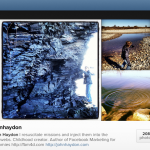
John HaydonDid you know that Instagram profiles on the Web are now live? Until now, all interactions on Instagram (purchased by Facebook earlier this year) took place entirely on smartphones. Here’s my profile pageif you’d like to see what they look like.

Sweet and simple, right? I like that profiles are only for the purpose of viewing, commenting on, and liking photos. But snapping, creating and sharing photos is still mobile-only as if to preserve the simplicity and pureness of the experience. Continue reading

September 27, 2012

Is Instagram useful for nonprofit marketing?

Target audience: Nonprofits, cause organizations, foundations, NGOs, social enterprises, Instagram users.

Guest post by Beth Kanter
bethkanter.org

Instagram, the mobile photography app (and company) purchased by Facebook, has been getting a lot of attention lately. From critics saying it is killing photography to hype and hoopla from marketing pundits saying it is a must-have as part of your “visual marketing tool box.”

In Steve Rubel’s Ad Age post, The Revolution Won’t Be Televised; It Will Be Instagrammed, he points out some underlying trends that might make some of the hype less hype:

September 5, 2012

7 image editing tools to create top-rate visual content


Martie Maguire of the Dixie Chicks at last year’s National Conference on Volunteering and Service (Photo by JD Lasica).

Target audience: Nonprofits, cause organizations, foundations, NGOs, social enterprises, businesses, educators, visual artists, photographers, general public.

John HaydonImages are one of the best ways to tell your story, simply because they convey emotional and unconscious elements of your story that words often cannot.

This is why people share photos the most on Facebook, and why Pinterest has blown up practically overnight.

The shift toward visual storytelling also means that you need the ability to quickly edit the photos you are sharing. You need the ability to do several things with an image:

  • Cropping – There are lots of optimal sizes for photos on social media sites, requiring the ability to crop images on the fly.
  • Adding text – A picture says 1,000 words, but adding text narrows the field.
  • Combining images – Before/after pics and infographics.
  • Adjusting contract and tone – Many times the photos you take at an event will need a little touching up.
  • Resizing images – Hi-res images taken with a Canon Powershot might be way too big for a Facebook Page update.
  • Creating various file types – Depending on the situation, you may need JPGs, PNGs or GIFs.

7 image editing tools to create top-rate visual content

Here are seven tools you should check out for your image editing needs.

Instagram: An undeniable cool factor

1Instagram is an iPhone and Android app that’s both a social network and a very cool photo editor. In terms of editing, the only thing you can do is square cropping and applying a variety of retro-style filters. Sharing to Facebook, Twitter and Tumblr is super easy. Recommended for arts organizations and perhaps museums. Continue reading